PopArt FX Camera2.0
Publisher Description
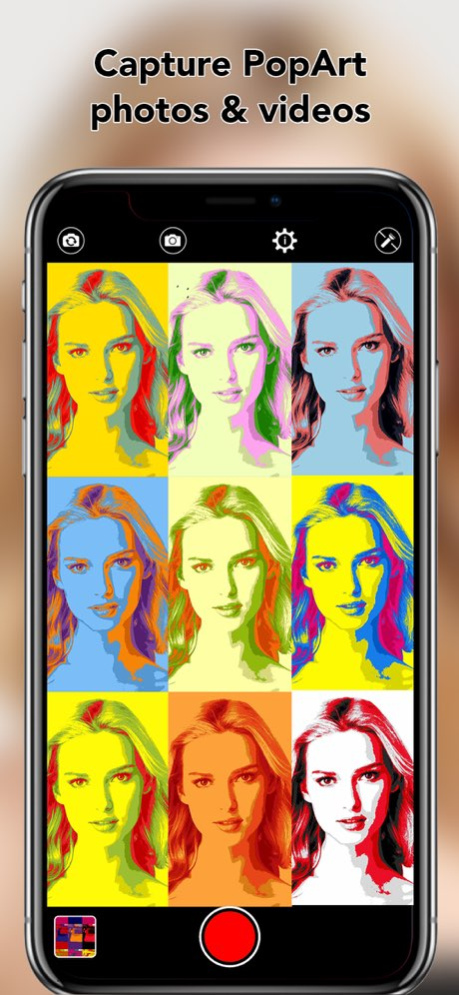


Apply Pop Art color effects on your camera and make your own Pop Art photo and video galleries !
PopArt FX Camera is a Pop Art app that lets you create your own Pop Art color patterns, save them, and apply them whenever you want on your camera to capture square or rectangular 1x1, 2x2, and 3x3 Pop Art photos and videos !
Define your own patterns by changing the colors. Try different patterns and find the perfect match for your photo/video. Create your patterns from scratch or modify one of the predefined patterns.
Save your patterns and use them later on
Adjust the different color repartition, based on the subject and light conditions, for better renderings
Special features:
- create your very own Pop Art color patterns
- save all your own color patterns
- 40 different color patterns included
- adjust the different color repartition
- capture square or rectangular 1 by 1, 2 by 2, and 3 by 3 photos and videos
- all your Pop Art photos and videos are saved in the app gallery to be easily viewed and shared
- share your Pop Art masterpieces on social networks, by email, save them in your camera roll, or export them to other apps installed on your device
If you have any issue, problem or question regarding the app, or suggestions to improve it, just drop us an email at support@seb-appstore.com
Check out many other great iOS apps at SEB-AppStore.com, with hundreds of free and discounted apps.
Version History Bug fixes 2.0 11/05/2023 Work around an Apple bug that freezes the display on devices running the iOS 11; thank you for your patience
Ready for the iPhone X
Minor bug fixes 1.5 02/08/2018 1.0 09/27/2017
About PopArt FX Camera
The company that develops PopArt FX Camera is Sebastien BUET. The latest version released by its developer is 2.0.
To install PopArt FX Camera on your iOS device, just click the green Continue To App button above to start the installation process. The app is listed on our website since 2026-10-06 and was downloaded 24 times. We have already checked if the download link is safe, however for your own protection we recommend that you scan the downloaded app with your antivirus. Your antivirus may detect the PopArt FX Camera as malware if the download link is broken.
How to install PopArt FX Camera on your iOS device:
- Click on the Continue To App button on our website. This will redirect you to the App Store.
- Once the PopArt FX Camera is shown in the iTunes listing of your iOS device, you can start its download and installation. Tap on the GET button to the right of the app to start downloading it.
- If you are not logged-in the iOS appstore app, you'll be prompted for your your Apple ID and/or password.
- After PopArt FX Camera is downloaded, you'll see an INSTALL button to the right. Tap on it to start the actual installation of the iOS app.
- Once installation is finished you can tap on the OPEN button to start it. Its icon will also be added to your device home screen.
Program Details
System requirements
Download information
Pricing
Version History
version 2.0
posted on 2026-10-06
Version History Bug fixes 2.0 11/05/2023 Work around an Apple bug that freezes the display on devices running the iOS 11; thank you for your patience
Ready for the iPhone X
Minor bug fixes 1.5 02/08/2018 1.0 09/27/2017
version 2.0
posted on 2026-09-04
Version History Bug fixes 2.0 11/05/2023 This app has been updated by Apple to prepare for watchOS 27 compatibility. No new features are included.
Work around an Apple bug that freezes the display on devices running the iOS 11; thank you for your patience
Ready for the iPhone X
Minor bug fixes 1.5 02/08/2018 1.0 09/27/2017
version 2.0
posted on 2026-08-22
Version History Bug fixes 2.0 11/05/2023 This update from Apple will improve the functionality of this app. No new features are included.
Work around an Apple bug that freezes the display on devices running the iOS 11; thank you for your patience
Ready for the iPhone X
Minor bug fixes 1.5 02/08/2018 1.0 09/27/2017
version 2.0
posted on 2023-11-05
Nov 5, 2023
Version 2.0
Bug fixes
version 2.0
posted on 2023-11-05
Bug fixes
version 1.5
posted on 2018-02-08
Feb 8, 2018
Version 1.5
This app has been updated by Apple to display the Apple Watch app icon.
Work around an Apple bug that freezes the display on devices running the iOS 11; thank you for your patience
Ready for the iPhone X
Minor bug fixes
